Performance Max in 2026: What Most Ad Accounts Are Still Getting Wrong
Most conversations about Performance Max miss the point.
TL;DR PMax doesn't have a performance problem—it has a configuration problem. Pick a conversion goal that reflects real business value. Check where your ads are actually serving. Isolate branded traffic so the campaign isn't taking credit for customers who were already coming.
The debate usually goes one of two ways: PMax is Google's greatest gift to advertisers, or it's a black box that wastes budget. Neither side asks the question that decides how the campaign actually performs: what signals are you giving it?
PMax decides how to place your ads based on the feedback you give it through the conversion goals you set at the campaign level. The problem is that most accounts aren’t intentional enough about selecting the right goal and never check whether the conversions PMax is reporting are actually turning into new customers. The dashboard says the campaign is working, so nobody looks any closer.
The risk isn't that the algorithm doesn't work. It's that most accounts haven't checked whether the goals they selected are steering PMax in the wrong direction.
After running PMax across our portfolio—national ecommerce, local retail, B2B lead gen, service businesses—the pattern is consistent. The accounts where it works and the accounts where it burns budget aren't separated by strategy or industry. They're separated by whether anyone is doing the three things the campaign actually needs.
What Is Performance Max?
Think of PMax like hiring one contractor to renovate an entire house, rather than different specialists for each room. The contractor has broad capabilities—they can handle the kitchen, the bathrooms, the electrical, the landscaping. Give them a clear blueprint and quality materials, and the results can be exceptional. Give them vague instructions and a mixed bag of supplies, and they'll make decisions that may or may not reflect what the homeowner actually wanted.
PMax works the same way. It runs across every Google surface—Search, Shopping, YouTube, Display, and Maps—simultaneously. The algorithm decides where to place ads, who to show them to, and how much to bid. Advertisers provide the assets, the budget, and the conversion goals. Google handles the rest.
That arrangement is fine when the inputs are aligned with business goals, and you’re watching how it’s actually delivering.
Things to Check Before You Trust a PMax Campaign
Most of the PMax horror stories we see come from two things.
The wrong conversion goal was selected. PMax optimizes toward whatever conversion event you set. Form fills, calls, purchases, clicks. The algorithm has no opinion on which of those represents real business value, so if you picked the wrong one, the campaign will get good at producing the wrong outcome. Tip: Also good to ensure leads are qualified.
The right controls weren't put in place to steer campaign delivery. PMax can run on Search, Shopping, YouTube, Display, or Maps in any mix. The placements shift based on the conversion signal, sometimes dramatically. You may assume PMax is mostly on Google Search with a little Display. When the signal is weak, it's often the other way around.
We've compiled 3 common problems that can result from the wrong conversion goal or not diving deep enough into true campaign delivery.
1. Performance Max stealing branded search traffic
Branded search cannibalization is one of the most common—and most consequential—issues in PMax accounts.
There are times when it makes sense to target your own branded terms, but keep in mind these branded searches convert at a significantly higher rate and usually much cheaper. This means there is a risk that Google sees the highly converting, low-cost branded traffic and shifts the campaign to spend more than you intended on your own brand.
The campaign looks like its driving results, when in reality, it's crediting itself for searches that would have come through anyway.
The solution is to run a dedicated branded Search campaign and apply a campaign-level negative keyword list to PMax excluding the brand name—so the two campaigns never compete for the same traffic. The result is two clean performance numbers. It's a small set-up decision with a big impact on both performance and insight into what's actually working.
2. Performance Max Getting Tricked By Low Quality Conversions
This one is harder to catch because the conversions are real. The phone really rang, and the form was submitted.
The question is, what is the value of those calls and forms to the business?
Choosing a bidding strategy that prioritizes certain conversions is ideal, but it is still a good practice to verify that those conversions are the type of customers you assume they are. If PMax has started to show primarily on branded traffic (#1 above), these calls may be current customers. It may be people searching competitor terms and mistakenly calling the first result they see. You may see Google Ads recording form fills from PMax, but find out the leads are largely unresponsive.
The problem is, PMax is doing exactly what you told it. It’s going after the easiest click-to-call conversions or form fills. But Google’s algorithm isn’t able to discern which are most valuable to your business and result in real new customers.
To better understand where these calls and forms come from and their value, you can do several things.
- Look at the PMax search term report under insights and reports > search terms to see what someone actually searched before reaching out
- Ensure your CRM captures UTM tracking parameters to help you attribute leads to your ads.
- If you don’t have a CRM, you could make a special landing page for your ad traffic. This way, any lead submitted from the page has to come from ads.
- Sometimes, a simple pulse check from the sales team or whoever handles calls and leads can yield valuable insights!
If you want to improve call and lead quality, consider adjusting your bidding strategy, uploading converted leads as new conversions, adding negative keywords, and excluding placements.
3. Performance Max Serving To Low Quality Placements
Campaign-level reporting isn’t enough to determine whether your PMax campaign is delivering as intended. We see that campaigns can easily drift into low-quality placements or into more spend across certain channels than intended if not monitored closely.
Even a well-configured campaign is worth checking, because the channel mix and placements can shift over time as things change.
Two reports inside Google Ads will tell you what's happening. The first is the channel breakdown, which shows how budget is splitting across Search, Shopping, YouTube, Display, and Maps within a single PMax campaign. You'll find it inside the campaign view itself. The second is the Performance Max Placement Report, which shows the specific websites, apps, and YouTube channels where your ads appeared (Campaigns > Insights and reports > Report editor > Performance Max campaigns placement). The placement report only shows impression volume, not performance, but it's enough to spot when the budget is going to mobile games, junk sites, or non-ideal YouTube content.
If the channel mix looks reasonable and the placements are clean, you're in good shape. If something looks off, you may want to ask yourself if the signals you’re giving (with the goal you’ve selected) are steering it in the wrong direction.
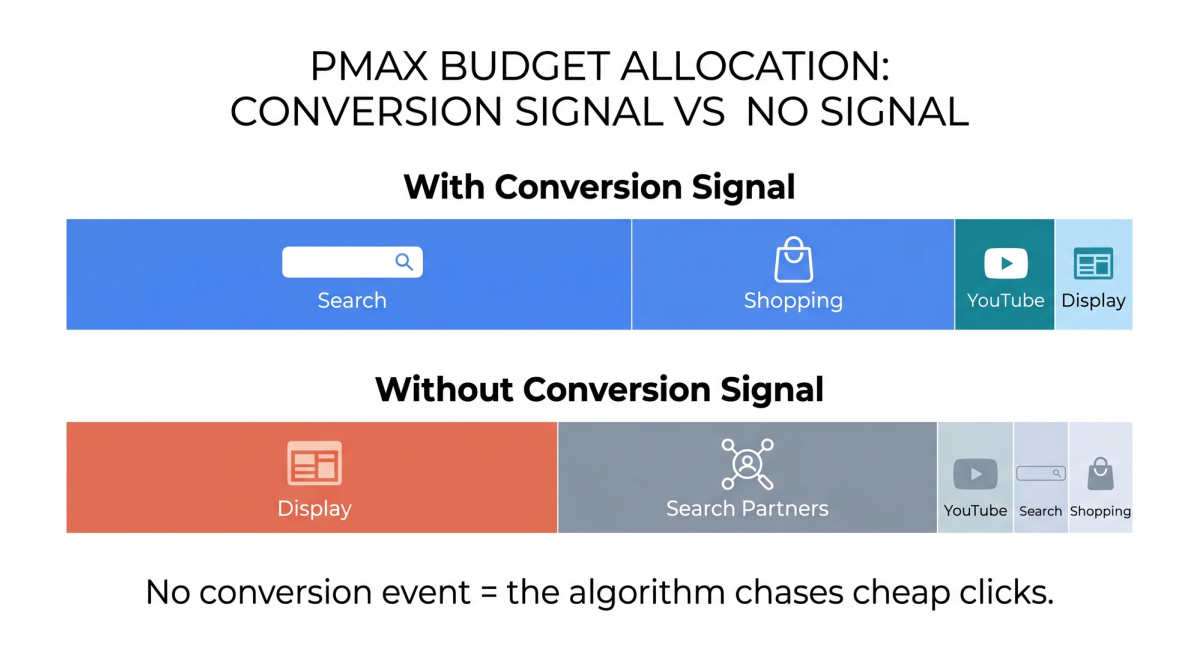
Without a conversion signal, PMax allocates budget toward cheap, low-intent inventory — Display and Search Partners dominate. With proper conversion tracking in place, budget shifts toward Search and Shopping, where purchase intent is highest.
Our recommendation: use max conversions with a target whenever possible.
What This Looks Like in Practice
One of AdShark's clients—a direct-to-consumer fitness equipment brand selling everything from entry-level gear to equipment packages—illustrates exactly why campaign structure determines what the algorithm learns.
The account's early PMax approach mirrored what most accounts default to: a single consolidated campaign covering the full product catalog. The setup was straightforward to manage, and the top-line ROAS looked reasonable. But the number masked what was actually happening underneath. Budget was concentrating heavily toward the highest-volume product line while other product categories—some with significantly stronger margins—while other product categories were receiving a fraction of the budget they warranted.
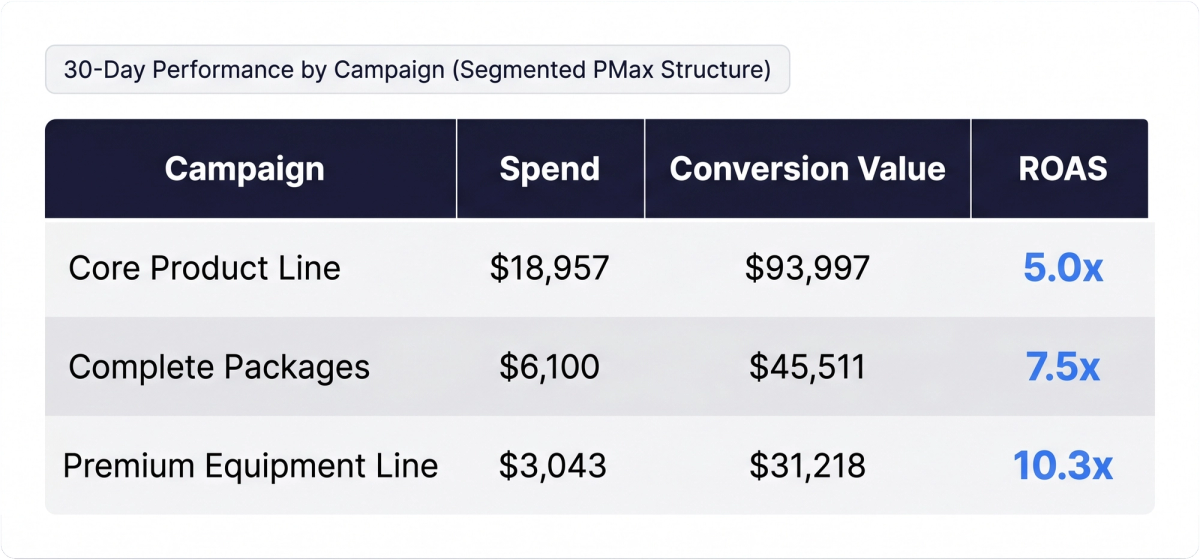
The restructure separated PMax into distinct campaigns by product line, each with its own budget, bidding target, and conversion signals. Three campaigns are currently active. Here's what the last 30 days shows:
:
30-day results from a segmented PMax structure. Separating campaigns by product line revealed significant ROAS variation—the Premium Equipment Line outperformed at 10.3x on a fraction of the spend.
Under a consolidated structure, the algorithm would have averaged across all three—and optimized toward whatever converted most frequently, which in a catalog like this tends to be the highest-volume, lowest-ticket item regardless of margin. The premium equipment line, generating over 10x return on ad spend, would have been systematically underserved.
With segmented campaigns, each product line gets a dedicated budget, a dedicated learning signal, and a dedicated ROAS target. Budget decisions are intentional rather than defaulted. And when a product line underperforms—as a fourth campaign, covering storage products, eventually did—it can be paused without contaminating the signal quality of the campaigns that are working.
The structure changed what the algorithm was allowed to learn.
Tying it All Together
What Actually Determines PMax Performance?
Performance Max is a sophisticated tool that produces results proportional to the quality of information it receives.
The accounts that find PMax frustrating are usually the ones that handed it a vague assignment and expected precise actions in return. The contractor analogy remains true: the blueprint matters as much as the builder.
PMax is a strong tool when the inputs are right and a liability when they're not. You just have to determine whether your account is able to provide the right signals and put these checks in place.
- Pick the right goal. Form fills, clicks, and calls aren't equivalent. Track a high-value event and use that as your signal, not clicks. If possible, import converted leads into Google Ads.
- Check your delivery. The channel report, placement report, and search term report are enough to catch a campaign that's drifted into a non-deal state that needs to be corrected.
- Branded search isolation: Running a dedicated branded Search campaign and applying a negative keyword list to PMax prevents cannibalization and inflated conversion reporting.
AdShark is a performance-based digital marketing agency headquartered in Fargo, N.D. This analysis reflects campaign data across client accounts managed by AdShark. Client names and identifying details have been anonymized.